When text is about to go into ChatGPT, Claude, Gemini, or another AI tool, the app anonymizes whatever is in your clipboard at that moment.
Local macOS app for sensitive text
Before the prompt
Before sending
And back again
Before data leaves your Mac, it loses its identity. Once the AI has answered, their identity is restored.
KI-Anonymizer steps in at the moment sensitive text is about to leave your Mac through copy and paste into AI tools, email, documents, or other systems.
Its strength is the shortcut: a fast, local step in your clipboard workflow. It runs on your Mac, needs no account, and adds almost no friction where speed would otherwise overtake caution.
For anyone – in law firms, medical practices, tax advisory, HR, or public administration – who wants to check sensitive content locally before AI use, sharing, email, or publication. The mapping table for the restore lives in memory only: max. 5 minutes, then it is gone.
The same step also helps before email, review, documentation, sharing with third parties, or internal approvals.
The AI replies with placeholders – a second shortcut restores the real names locally. No other tool closes this loop.
Live demo of the clipboard moment
1 · Your original
Dear Ms. Maria Gonzales,
born on 12.05.1987, resident at Berliner Str. 42a, 61169 Friedberg,
SVN 53 270587 G 412 ...
2 · To the AI
Dear [Person 1],
born on [Date 1], resident at [Address 1], [Address 2],
SVN [Identifier 1] ...
3 · Back with you
Dear Ms. Maria Gonzales,
please find the revised draft attached.
Real names restored locally – mapping in memory only.
⌘
⇧
A
global hotkey
⌘C copy
⌘⇧A anonymize
⌘V paste
⌘⇧D real names back
Platforms
One product idea. Multiple places to work.
Use KI-Anonymisierer wherever sensitive content appears: as a native Mac app, on iPhone and iPad, as a native Windows app, or directly in Chrome for free.
macOS
Menu bar app with global hotkey, editor, image anonymization, retouching, and local processing.
View Mac app →iPhone & iPad
For mobile text, screenshots, photos, Share Sheet workflows, and PDF content as plain text.
Open iOS page →Chrome
Browser extension for quick text anonymization directly on the web, without buying the Mac app.
View Chrome extension →Windows
Tray app with Ctrl + Shift + A, editor, regex, built-in NER and optional local AI. For text, right on your own PC. German interface.
View Windows app →Sensitive data rarely leaks in an archive. It leaks in motion, when names, addresses, phone numbers, or identifiers are pasted into the next system too quickly.
The app stays visible, fast, and local. It is not trying to become a dashboard. It is there for the moment when copy and paste would otherwise become careless.
Dear Ms. Maria Gonzales, born on 12.05.1987, resident at Berliner Str. 42a, 61169 Friedberg, SVN 53 270587 G 412 ...
Dear [Person 1], born on [Date 1], resident at [Address 1], [Address 2], [Identifier 1] ...
Workflow
Four steps. No workflow overhaul.
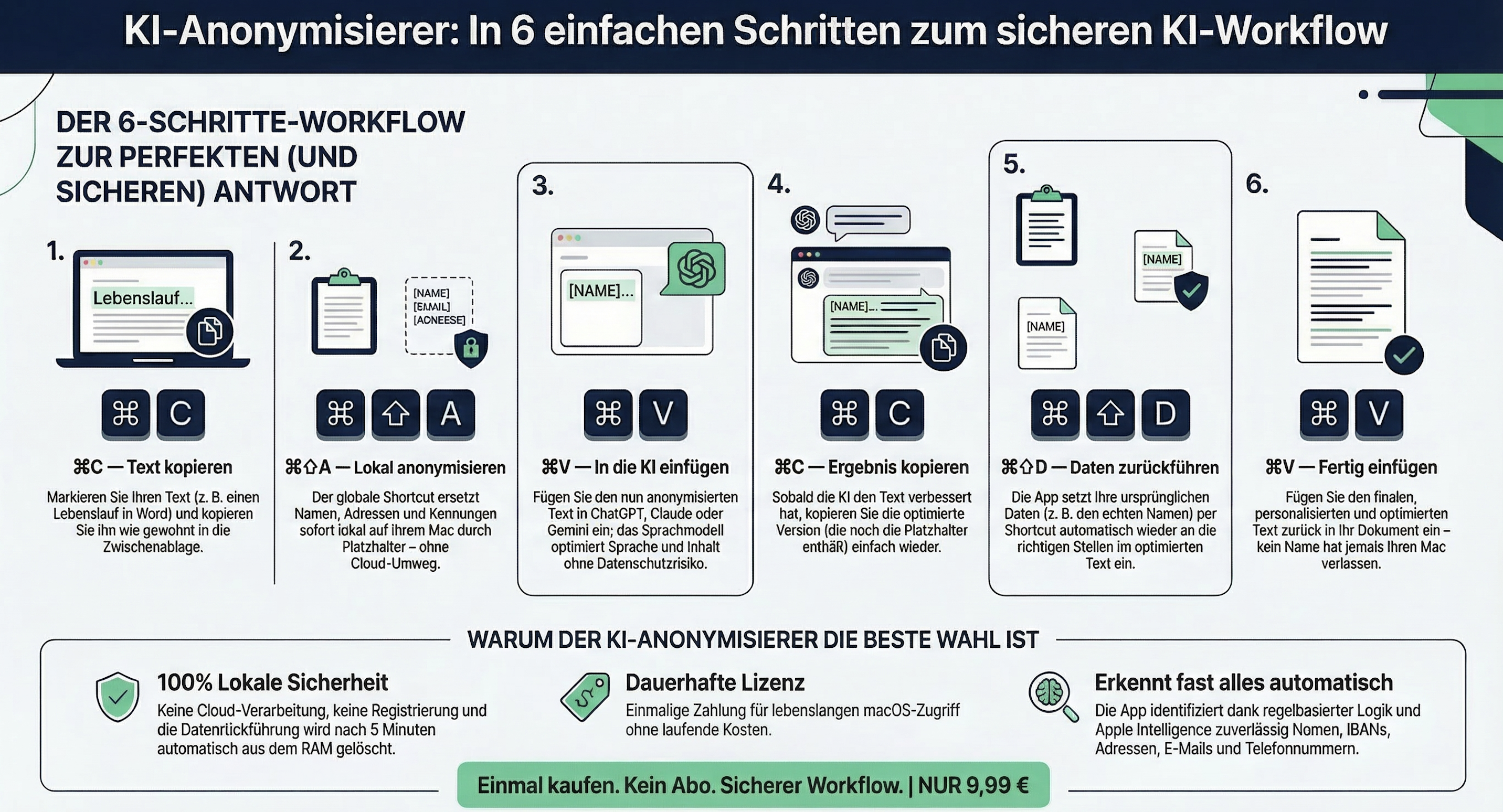
The editor remains the visible control layer. The core is the global shortcut: one local handoff that protects your existing copy-and-paste routine instead of slowing it down.
01
Copy text
Select the sensitive passage and copy it as usual.
From email, a document, a browser tab, a note, or a draft for an AI chat.
⌘
C
Clipboard
02
Trigger shortcut
One shortcut anonymizes the clipboard locally on your Mac.
No cloud, no account, no extra process.
⌘
⇧
A
03
Paste and review
Paste the anonymized version and review it if needed.
For longer passages or sensitive cases, the editor remains the calm review view.
⌘
V
Visual review
04
Restore the real names
Send anonymized text to the AI, bring the answer back, restore the real names with a shortcut – no other tool closes this loop.
The mapping is limited to the most recent session, kept in memory only, and cleared automatically after five minutes.
Workflow media
Six steps as one compact diagram for the complete workflow.
If you want to see the full flow at a glance, you can enlarge the diagram here.
Detection
Rule-based at the core, language-aware where it helps, local throughout.
The app handles classic personally identifiable information in structured local layers. Fixed patterns such as IBANs, dates, or email addresses are treated differently from names and places, which makes detection both faster and more reliable.
People
Personal names with stable placeholder mapping
Names, common name contexts, and repeat occurrences are mapped to consistent placeholders so the result stays readable.
Addresses
Street addresses as connected context
Address parts are handled as one connected structure instead of scattered isolated matches.
Contact data
Email, phone, and fax in common formats
The app detects common contact patterns locally and quickly without external processing.
Identifiers
IBANs, file references, social security numbers, and similar patterns
Formal identifiers use their own detection logic, which makes them more robust than treating them like ordinary language.
Custom rules and exclusions
Not every sensitive term fits a standard pattern. Fixed terms can be set to always be anonymized or explicitly excluded.
Terms can be set to always be anonymized.
Other terms can be explicitly excluded.
That lets the app adapt to real workflows instead of demo cases.
Control stays with the human reviewer
The app supports the workflow. Final judgment stays with the person reviewing the text.
Rule-based detection can be incomplete in individual cases.
Apple language detection and optional Apple Intelligence only add support.
A review is always required before sharing or publishing.
Apple Intelligence
An extra local detection layer, if available on your Mac.
KI-Anonymizer works fully without Apple Intelligence. If Apple's on-device models are available, the app uses them as an extra semantic layer for people and places that fixed rules or classic language detection may miss.
Regex
Handles fixed patterns
Ideal for email, dates, phone numbers, IBANs, file references, or other clearly structured patterns.
NaturalLanguage
Finds names and places
Detects typical person and place references locally through Apple NaturalLanguage.
Apple Intelligence
Adds semantic context
Can catch additional person or place references that do not fit neatly into fixed patterns. It complements the other layers instead of replacing them.
Limit
Assistance, not certainty
The app runs locally and carefully, but final human review and legal assessment still matter.
App insights
The real app, shown as it is.
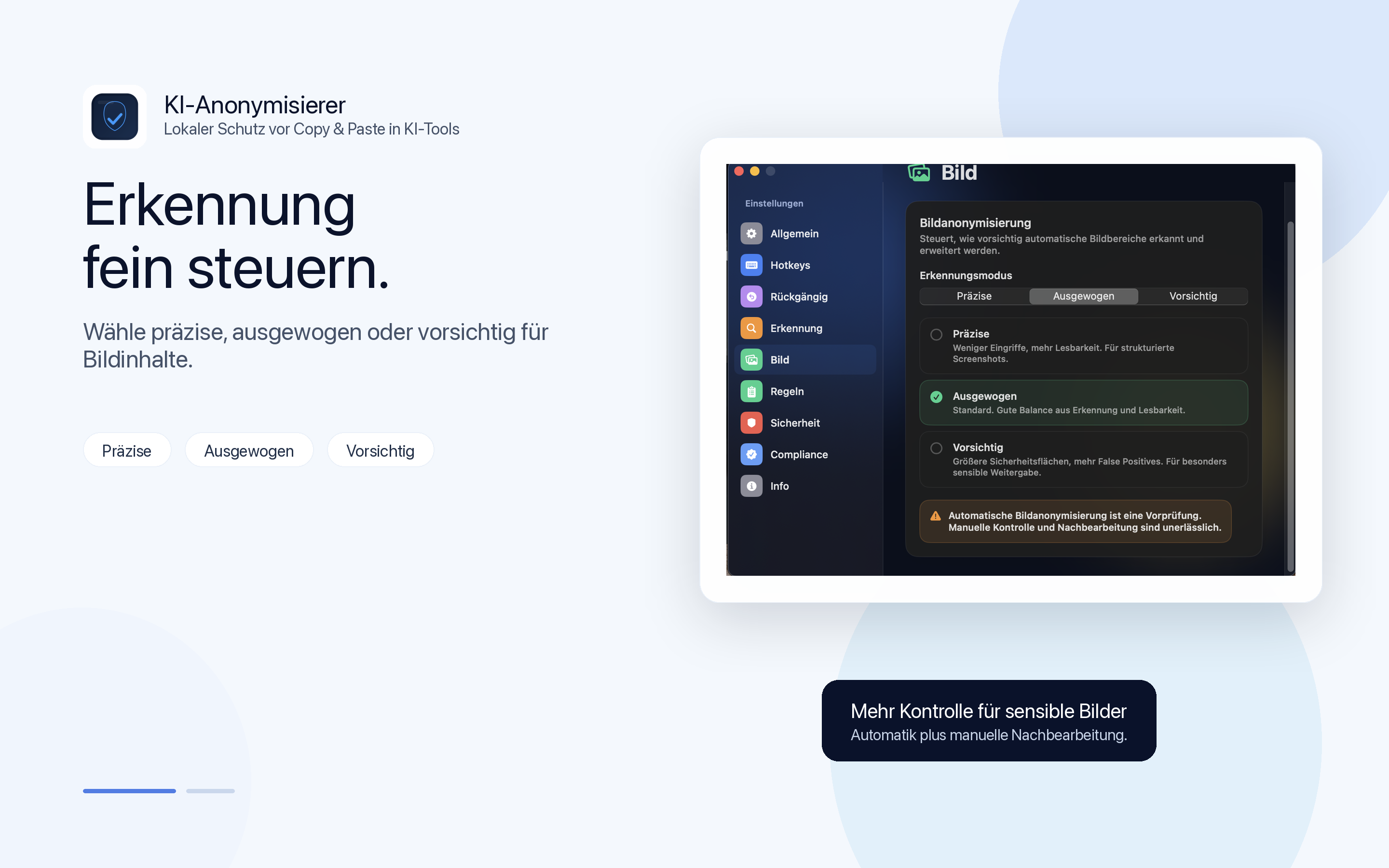
These are product screens, not marketing mockups: the editor, the settings, and the in-app notice. Click any view to enlarge it and see what it does.
Pricing
Pay once. No subscription. Ready right away.
For macOS 14.0 or newer. One payment instead of recurring fees, and local anonymization instead of a cloud detour.
macOS 14.0+ · menu bar app · global hotkey
Available on the Mac App Store.
€9.99
A local step exactly where sensitive content would otherwise be passed on too quickly.
Copy, anonymize, paste. That is all the core workflow needs.
- Text and image anonymization including OCR, faces, barcodes, and retouching
- Local detection without cloud processing
- Global hotkey plus editor for visible control
- Image detection categories configurable in settings
- Custom rules, exclusions, and statistics
- Optional Apple Intelligence support
- Signed for macOS, ready to install
Buy a single license on the Mac App Store:

You can also buy the app directly outside the App Store, including team licenses.
By purchasing, you accept the EULA. Purchases through the Mac App Store are also subject to Apple's terms.
Questions & answers
The questions that matter before you buy.
These are the questions that usually come up before buying a local Mac app for anonymization: AI tools, local processing, restore mapping, and the role of Apple Intelligence.
Is the app only for AI chatbots?
No. The main use case is often copy and paste into AI chatbots. The same local step is useful before email, approval, review, documentation, or sharing with third parties.
Does my text leave the Mac?
The anonymization itself runs locally on the device. The app is built to clean sensitive content before it is pasted into other systems, before an external data flow even begins.
What exactly does Safeguard do?
Safeguard proactively checks the clipboard locally for sensitive data. If the app detects names, addresses, identifiers, or similar content after copying, it alerts you right away and can anonymize the content immediately without requiring the shortcut first.
The feature can be turned on or off at any time in settings or from the menu bar.
What does Apple Intelligence add?
If Apple Intelligence is available locally, it can catch additional person or place references. Structured data such as IBANs or email addresses remain rule-based.
How does restore mapping work in practice?
By default, KI-Anonymizer follows the fast flow: copy, anonymize, paste. Optional restore mapping extends that workflow to the end.
You can send anonymized text to an AI tool, copy the edited answer back, and restore the placeholders to their original references with a second shortcut. The mapping is kept only for the most recent session, only in memory, and is deleted automatically after 5 minutes.
What comes next?
The native Windows app is now available on the Microsoft Store. Next, the Mac version will add PDF document anonymization.
Why was the app built?
As an AI consultant, specialist author, and lecturer, I keep seeing the same mistake in practice: under time pressure, content is moved too quickly into chatbots, email, or other systems without first anonymizing sensitive data properly. KI-Anonymisierer was built for exactly that problem: a small, fast tool for the copy-and-paste moment.
Is the app available for other platforms?
Yes. There is a standalone Anonymisierer app for iPhone and iPad. It is designed for mobile workflows: anonymize text, clean screenshots and photos, receive content through the Share Sheet, and anonymize PDF content as plain text.
There is also a free Chrome extension for browser workflows. It is the easiest entry point when text should be anonymized directly in the browser.
For Windows, there is a native app on the Microsoft Store (one-time purchase, €14.99). It anonymizes text locally with regex, built-in NER and optional local AI, available from the tray icon and Ctrl + Shift + A. The app interface is German only.
For teams and organizations, there is a self-hosted server with a free Windows client that centralizes detection for many workstations, plus the Excel anonymizer for spreadsheets containing personal data.
View solutions for teams and organizations →
The web test version remains available as a demo, but it is not the focus of the product family.