When text is about to go into ChatGPT, Claude, Gemini, or another AI tool, the app anonymizes whatever is in your clipboard at that moment.
Local Mac app for sensitive text
Before the prompt
Before sending
Same flow
Before data leaves your Mac, it loses its identity.
KI-Anonymizer steps in at the moment sensitive text is about to leave your Mac through copy and paste into AI tools, email, documents, or other systems.
Its strength is the shortcut: a fast, local step in your clipboard workflow. It runs on your Mac, needs no account, and adds almost no friction where speed would otherwise overtake caution.
Local on your Mac
Global hotkey
Signed for macOS
No subscription
For Mac users who want to anonymize sensitive text locally before AI use, review, sharing, or email.
The same step also helps before email, review, documentation, sharing with third parties, or internal approvals.
Copy, anonymize, paste. The app fits the workflow instead of slowing it down.
Live demo of the clipboard moment
Before the shortcut
Dear Ms. Maria Gonzales,
born on May 12, 1987, living at 42a Berliner Street, 61169 Friedberg,
social security no. 53 270587 G 412 ...
After the shortcut
Dear [Person 1],
born on [Date 1], living at [Address 1], [Address 2],
social security no. [Identifier 1] ...
⌘
⇧
A
global hotkey
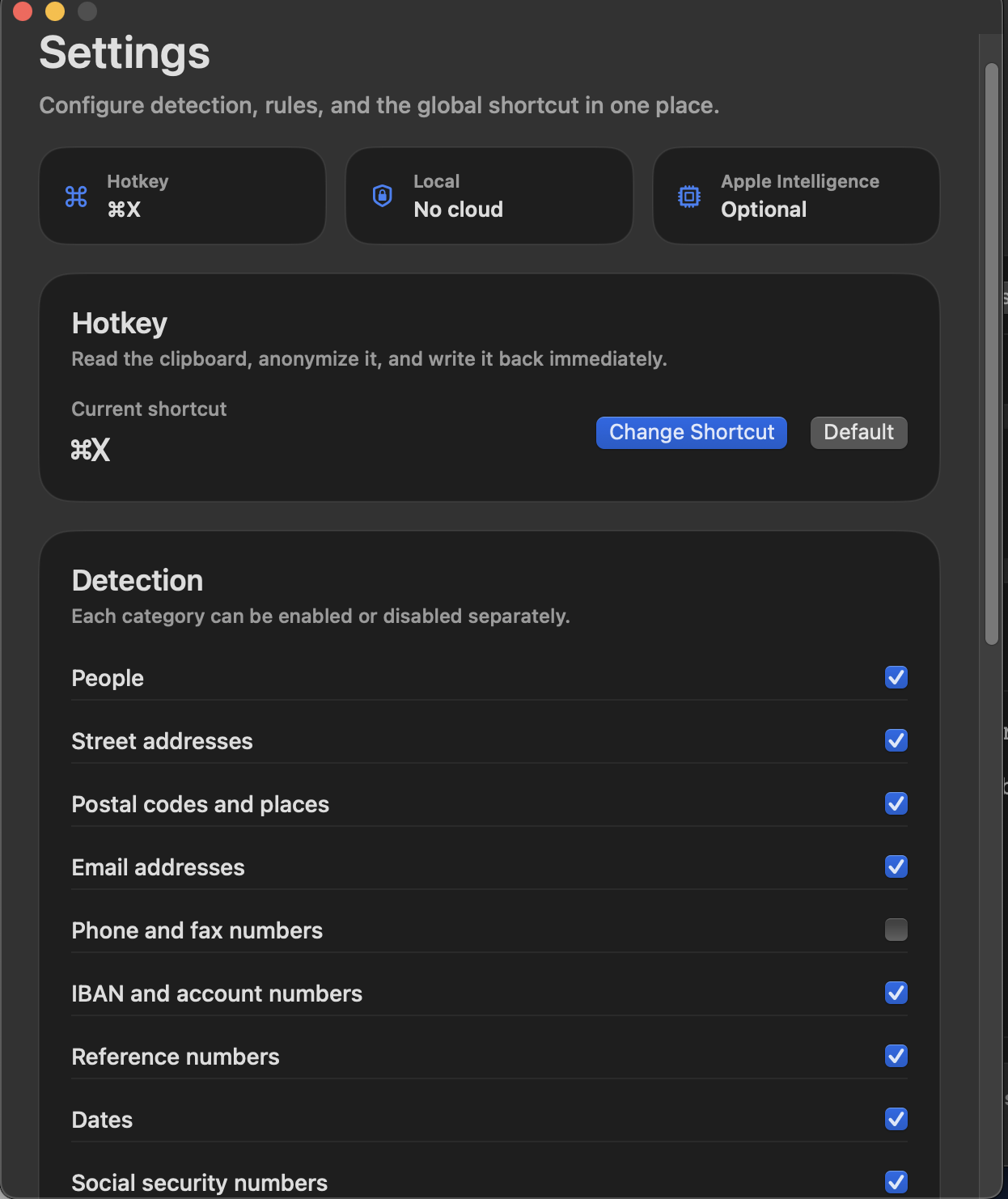
Hotkey + detection
Configurable
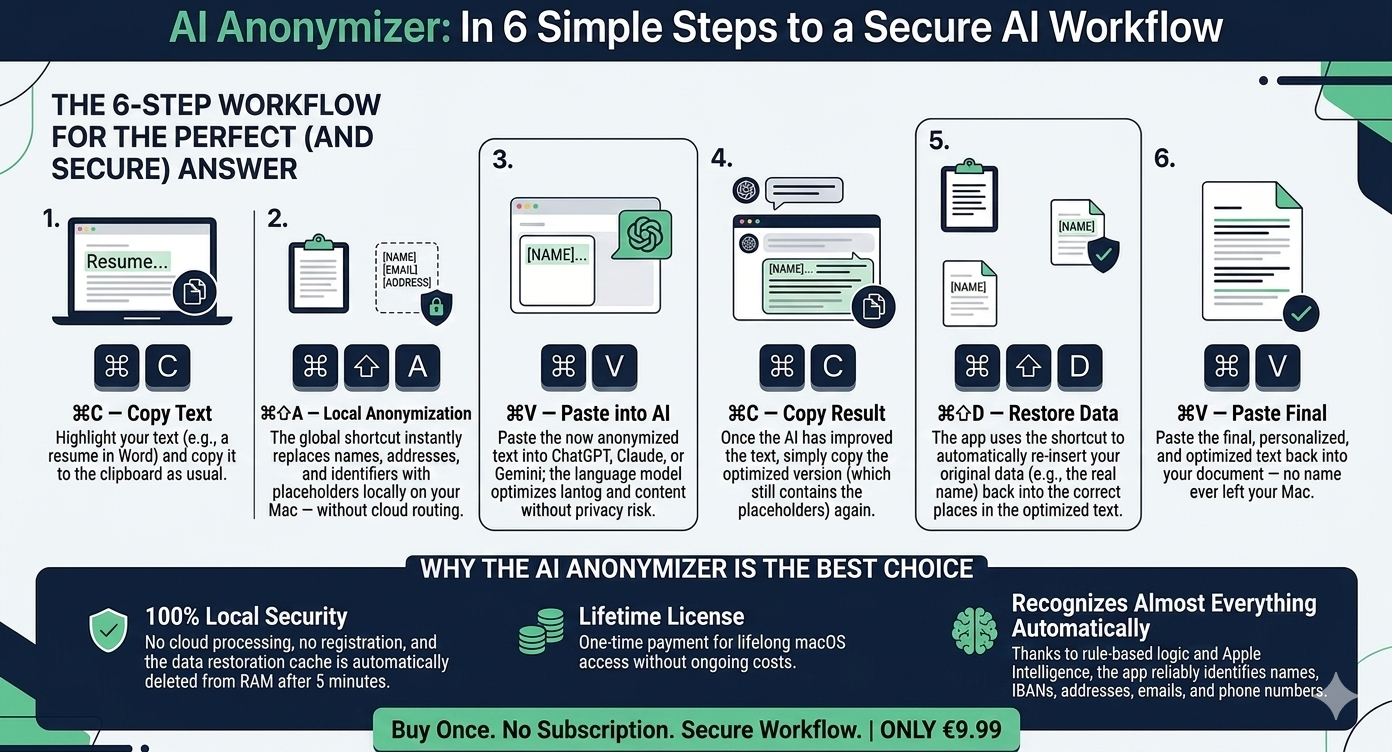
⌘C copy
⌘⇧A anonymize
⌘V paste
Optional: ⌘⇧D restore
Sensitive data rarely leaks in an archive. It leaks in motion, when names, addresses, phone numbers, or identifiers are pasted into the next system too quickly.
The app stays visible, fast, and local. It is not trying to become a dashboard. It is there for the moment when copy and paste would otherwise become careless.
Dear Ms. Maria Gonzales, born on May 12, 1987, living at 42a Berliner Street, 61169 Friedberg, social security no. 53 270587 G 412 ...
Dear [Person 1], born on [Date 1], living at [Address 1], [Address 2], [Identifier 1] ...
Workflow
Four steps. No workflow overhaul.
The editor remains the visible control layer. The core is the global shortcut: one local handoff that protects your existing copy-and-paste routine instead of slowing it down.
01
Copy text
Highlight the sensitive passage and copy it as usual.
From email, a document, a browser tab, a note, or a draft for an AI chat.
⌘
C
Clipboard
02
Trigger shortcut
One shortcut anonymizes the clipboard locally on your Mac.
No upload, no account, no extra process.
⌘
⇧
A
03
Paste and review
Paste the anonymized version and review it if needed.
For longer passages or sensitive cases, the editor remains the calm review view.
⌘
V
Visual review
04
Optional: restore mapping
Send anonymized text to AI, bring the answer back, restore the original references.
Limited to the most recent session, kept in memory only, and cleared automatically after five minutes.
Workflow media
Six steps as one compact diagram for the complete workflow.
If you want to see the full flow at a glance, you can enlarge the diagram here.
Detection
Rule-based at the core, language-aware where it helps, local throughout.
The app handles classic personally identifiable information in structured local layers. Fixed patterns such as IBANs, dates, or email addresses are treated differently from names and places, which makes detection both faster and more reliable.
People
Personal names with stable placeholder mapping
Names, common name contexts, and repeat occurrences are mapped to consistent placeholders so the result stays readable.
Addresses
Street addresses as connected context
Address parts are handled as one connected structure instead of scattered isolated matches.
Contact details
Email, phone, and fax in common formats
The app detects common contact patterns locally and quickly without external processing.
Identifiers
IBANs, file references, social security numbers, and similar patterns
Formal identifiers use their own detection logic, which makes them more robust than treating them like ordinary language.
Custom rules and exclusions
Not every sensitive term fits a standard pattern. Fixed terms can be set to always be anonymized or explicitly excluded.
Terms can be set to always be anonymized.
Other terms can be explicitly excluded.
That lets the app adapt to real workflows instead of demo cases.
Control stays with the human reviewer
The app supports the workflow. Final judgment stays with the person reviewing the text.
Rule-based detection can be incomplete in individual cases.
Apple language detection and optional Apple Intelligence only add support.
A review is always required before sharing or publishing.
Apple Intelligence
An extra local detection layer, if available on your Mac.
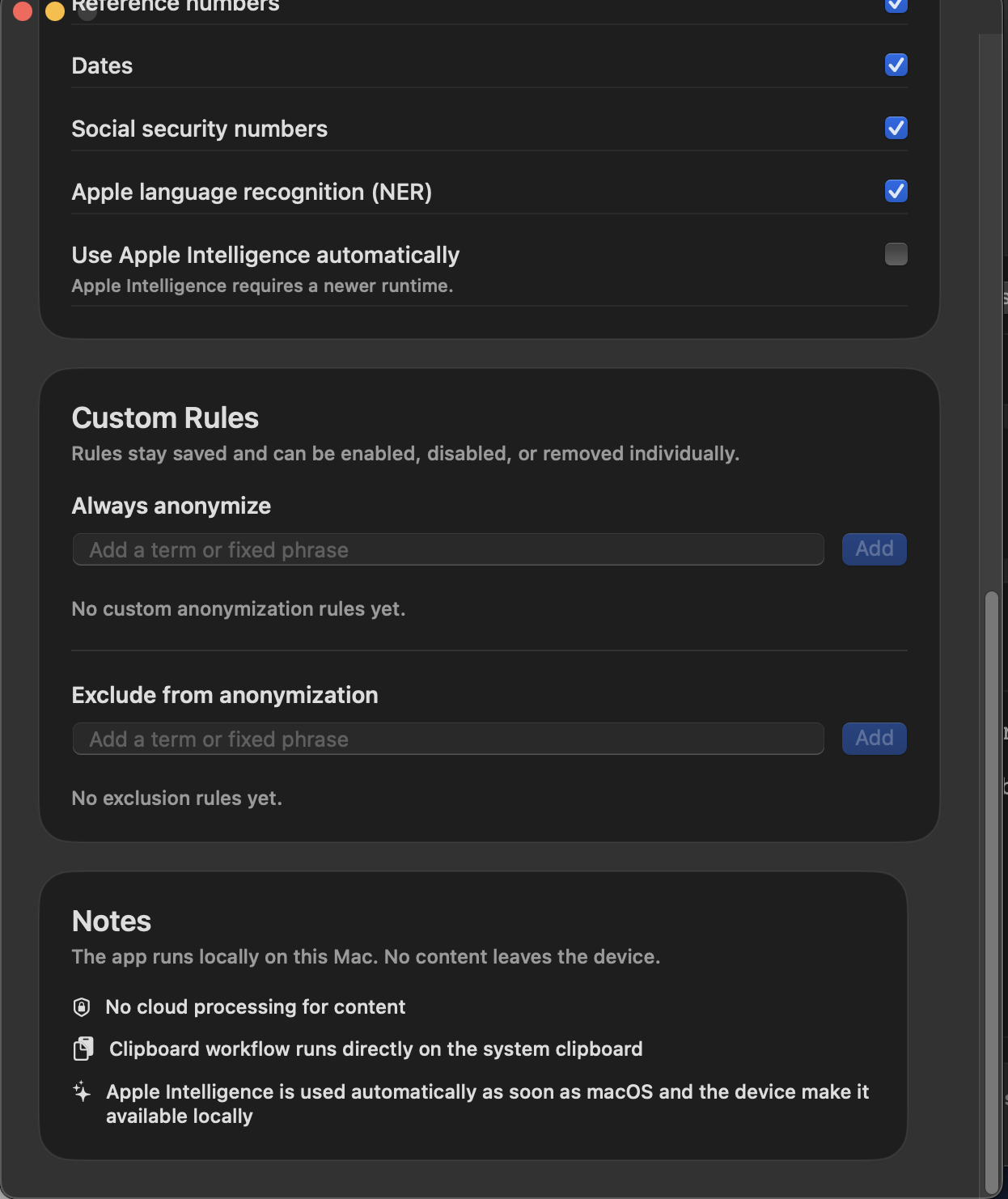
KI-Anonymizer works fully without Apple Intelligence. If Apple’s on-device models are available, the app uses them as an extra semantic layer for people and places that fixed rules or classic language detection may miss.
Regex
Handles fixed patterns
Ideal for email, dates, phone numbers, IBANs, file references, or other clearly structured patterns.
NaturalLanguage
Finds names and places
Detects typical person and place references locally through Apple NaturalLanguage.
Apple Intelligence
Adds semantic context
Can catch additional person or place references that do not fit neatly into fixed patterns. It complements the other layers instead of replacing them.
Boundary
Assistance, not certainty
The app runs locally and carefully, but final human review and legal assessment still matter.
App insights
The real app, shown as it is.
These are product screens, not marketing mockups: the editor, the settings, and the in-app notice. Click any view to enlarge it and see what it does.
Pricing
Pay once. No subscription. Ready right away.
For macOS 14.0 or newer. One payment instead of recurring fees, and local anonymization instead of a cloud detour.
macOS 14.0+ · menu bar app · global hotkey
Available on the Mac App Store.
9,99 €
One local handoff exactly where sensitive text is most likely to move too fast.
Copy, anonymize, paste. That is all the core workflow needs.
- New in version 1.2: Safeguard checks the clipboard proactively for sensitive data
- Local detection without cloud processing
- Global hotkey plus an editor for visible review
- Custom rules, exclusions, and statistics
- Optional Apple Intelligence support
- Signed for macOS and ready to install

You can also buy it directly outside the App Store.
Questions & answers
The questions that matter before you buy.
These are the questions that usually come up before buying a local Mac app for anonymization: AI tools, local processing, restore mapping, and the role of Apple Intelligence.
Is the app only for AI chatbots?
No. AI tools are the obvious use case, but the same local step is just as useful before email, internal review, approvals, documentation, or sharing with third parties.
Does my text leave the Mac?
The anonymization step runs locally on your device. The app is meant to clean up text before it enters any external system.
What exactly does Safeguard do (new in version 1.2)?
Safeguard checks the clipboard proactively and locally for sensitive data. If the app detects names, addresses, identifiers, or similar content, it alerts you right after the text is copied to the clipboard and offers immediate anonymization, without requiring you to trigger the shortcut first.
The feature can be turned on or off at any time in Settings or from the menu bar.
What does Apple Intelligence add?
If Apple Intelligence is available locally, it can catch additional person or place references. Structured data such as IBANs or email addresses remain rule-based.
How does restore mapping work in practice?
By default, KI-Anonymizer follows a fast workflow: copy, anonymize, paste. Optional restore mapping takes that workflow one step further.
You can send anonymized text to an AI tool, copy the revised result back, and then restore the original references with a second shortcut. The mapping is optional, limited to the most recent session, stored in memory only, and automatically cleared after 5 minutes.
What’s next?
- Rule packs for typical use cases such as administration, consulting, education, or HR.
- A transparent review mode with an additional hit list and a clearer control view.
- Templates and team rules for saving, exporting, and reusing custom rule sets.
- A local release report with timestamp and replacement summary.
Why was the app created?
In workshops, consulting, and training, I kept seeing the same mistake: under time pressure, people paste sensitive content into chatbots, email, or other systems before anonymizing it. KI-Anonymizer was built for exactly that moment.
Is the app also available for other platforms?
Yes. There is a dedicated Anonymisierer app for iPhone and iPad. It is built for mobile workflows: redact text, clean screenshots and photos, pass content in through the iOS Share Sheet, and extract PDF content as plain text.
View the iPhone & iPad version →
The web version also works on any device with a modern browser — Windows, Linux, Mac, tablet. No app store, no installation. Just open it in your browser. There is a free demo to try and a full version (DE + EN) available as a one-time purchase.