The app lives in the Windows notification area next to the clock. One click opens the editor, a right-click shows quick actions. Close the window and it keeps working in the background.
New: native Windows app
Local anonymization for your everyday Windows work.
Regex, built-in name recognition and an optional local AI layer – right on your PC, available from the tray icon, the editor and a keyboard shortcut.
Want to clean up text before using it in AI tools, emails or other applications, without setting up a central server? KI-Anonymisierer for Windows runs detection on your own computer.
One-time €14.99
Regex + NER local
AI optional
German interface
Copy, Ctrl + Shift + A, paste. The Windows app processes text; image and screenshot features remain part of the Apple apps. The app interface is currently German only.
Ctrl+C copy
Ctrl+Shift+A anonymize
Ctrl+V paste
Restoration optional
Built for anyone who wants detection to run on their own computer, independent of central infrastructure.
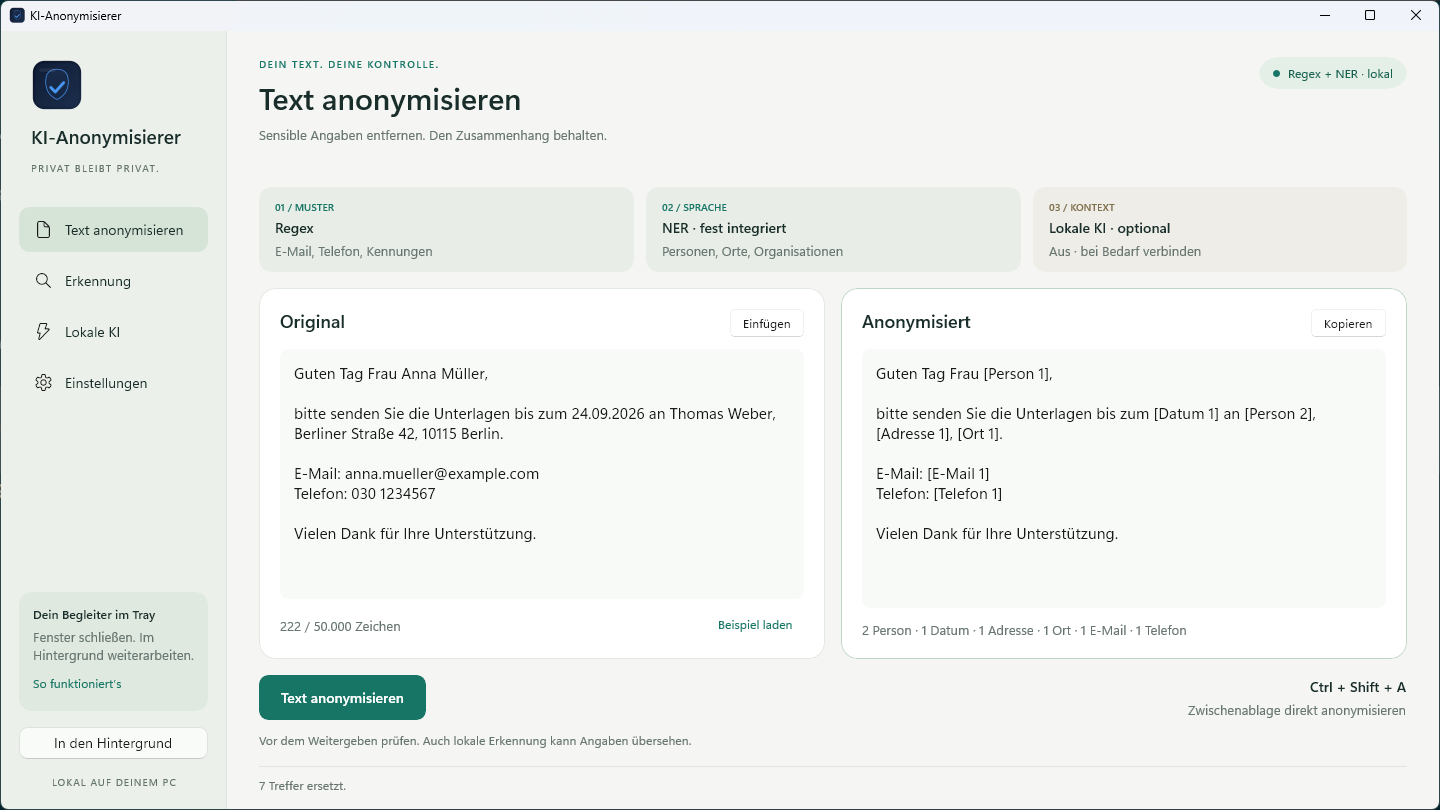
Guten Tag Frau Anna Müller, bitte senden Sie die Unterlagen bis zum 24.09.2026 an Thomas Weber, Berliner Straße 42, 10115 Berlin.Guten Tag Frau [Person 1], bitte senden Sie die Unterlagen bis zum [Datum 1] an [Person 2], [Adresse 1], [Ort 1].Features
Three detection layers. One fast workflow.
Rules catch structured details, built-in NER adds people, places and organizations. An additional local AI check is only added if you switch it on.
01
Regex
Email addresses, phone numbers, dates, IBANs and other identifiers. Define your own terms or deliberately exclude them.
Patterns
02
NER, built in
Named entity recognition finds people, places and organizations – without internet access or extra software.
Language
03
Local AI, optional
Set up a small model directly in the app or connect an existing Ollama or LM Studio installation. Regex and NER work without it.
Experimental
04
Tray, editor, shortcut
Ctrl + Shift + A anonymizes copied text. The editor shows the original and the result side by side.
Everyday Windows
05
Safeguard
If you choose, checks the clipboard locally for sensitive details and alerts you to what it finds.
Clipboard
06
Restoration
Map placeholders from the last session back, for example after an AI tool edited the text. The mapping stays in memory for five minutes at most.
Optional · 5 min max
Screens
The Windows app in use.
Original screenshots: anonymizing in the editor, detection with custom rules and the tray icon introduction. The app interface is currently German only.
Price
One-time purchase. No subscription. On the Microsoft Store.
One payment, local processing on your PC. Builds for x64 and ARM64.
Windows · Tray app · Ctrl + Shift + A · German interface
Available now on the Microsoft Store.
€14.99
Check text on your own Windows PC and replace detected details with placeholders. With regex, built-in NER, optional local AI and quick clipboard actions.
- Local text processing without an anonymization server
- Regex and built-in NER
- Optional additional AI check on your own PC
- Set up a small model in the app or connect Ollama or LM Studio
- Editor, tray icon and global keyboard shortcuts
- Local clipboard Safeguard
- Optional restoration of the last session, held in RAM for five minutes max
- Builds for x64 and ARM64
The additional small AI is an experimental add-on and does not guarantee complete detection. Setup downloads require an internet connection. The app interface is German only. The Mac app is not included.
Questions
Good to know before you buy.
The Windows app focuses on text. For images and screenshots, there are the apps for Mac, iPhone and iPad.
Is the app available in English?
Not yet. The app interface is currently German only.
Is my text uploaded?
No. Anonymization runs on your Windows PC, without an anonymization server. Whatever you then paste into other services is processed under their terms.
Do I need Ollama or LM Studio?
No. Regex and NER are built in and work without extra software. For the optional AI check, you can set up a small model directly in the app or connect an existing local Ollama or LM Studio installation.
How does restoration work on Windows?
When enabled, placeholders from the last session can be mapped back to the original details. The mapping is held in memory only, for five minutes at most.
Can the Windows app anonymize images and screenshots?
No. The current Windows version processes text. The image and screenshot features of the Apple apps are not automatically part of the Windows app.
Is the Mac app included?
No. The Windows app is a separate one-time purchase on the Microsoft Store. The Mac and iOS apps are purchased separately.